Smallest 2MP Wireless Streaming camera - ESP32 Cam
- RaviKumar Uthirapathy
- May 31, 2020
- 4 min read
Updated: Mar 3, 2022
Requirements:
ESP32Cam
USB FTDI Programmer
Windows PC
Female to Female Jumper wires
5v/2Amp MicroUSB Power supply adapter
Software requirements:
Arduino IDE
Preparation of ArduinoIDE to program ESP32 Cam Board
Open ArduinoIDE on windows pc , Open the preferences window from the Arduino IDE. Go to Arduino >file >Preferences
Enter https://dl.espressif.com/dl/package_esp32_index.json into the “Additional Board Manager URLs” field as shown in the figure below. Then, click the “OK” button
Open boards manager. Go toTools>Board>Boards Manager --- Search for ESP32 and press install button for the “ESP32 by Espressif Systems“
Connection diagram ESP32 Cam Board with FTDI Programmer
Connect the ESP32-CAM board to your computer using an FTDI programmer. Follow the next schematic diagram
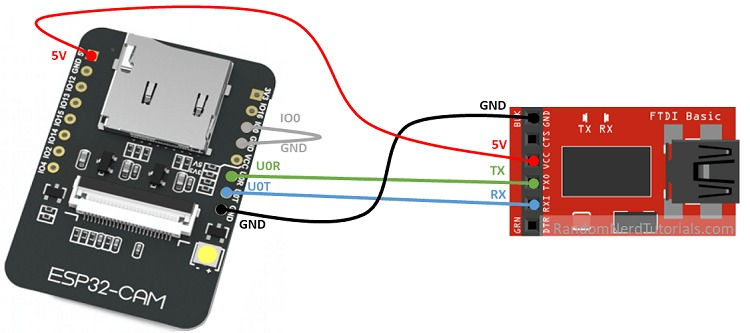
On Arduino Program, the following setting must needed for programming Esp32cam Board. - Select Board "AI Thinker ESP32-CAM" - GPIO 0 must be connected to GND to upload a sketch - After connecting GPIO 0 to GND, press the ESP32-CAM on-board RESET button then
click Upload button . #include "esp_camera.h" #include <WiFi.h> #include "esp_timer.h" #include "img_converters.h" #include "Arduino.h" #include "fb_gfx.h" #include "soc/soc.h" //disable brownout problems #include "soc/rtc_cntl_reg.h" //disable brownout problems #include "esp_http_server.h" //Replace with your network credentials const char* ssid = "REPLACE_WITH_YOUR_SSID"; const char* password = "REPLACE_WITH_YOUR_PASSWORD"; #define PART_BOUNDARY "123456789000000000000987654321" // This project was tested with the AI Thinker Model, M5STACK PSRAM Model and M5STACK WITHOUT PSRAM #define CAMERA_MODEL_AI_THINKER //#define CAMERA_MODEL_M5STACK_PSRAM //#define CAMERA_MODEL_M5STACK_WITHOUT_PSRAM // Not tested with this model //#define CAMERA_MODEL_WROVER_KIT #if defined(CAMERA_MODEL_WROVER_KIT) #define PWDN_GPIO_NUM -1 #define RESET_GPIO_NUM -1 #define XCLK_GPIO_NUM 21 #define SIOD_GPIO_NUM 26 #define SIOC_GPIO_NUM 27 #define Y9_GPIO_NUM 35 #define Y8_GPIO_NUM 34 #define Y7_GPIO_NUM 39 #define Y6_GPIO_NUM 36 #define Y5_GPIO_NUM 19 #define Y4_GPIO_NUM 18 #define Y3_GPIO_NUM 5 #define Y2_GPIO_NUM 4 #define VSYNC_GPIO_NUM 25 #define HREF_GPIO_NUM 23 #define PCLK_GPIO_NUM 22 #elif defined(CAMERA_MODEL_M5STACK_PSRAM) #define PWDN_GPIO_NUM -1 #define RESET_GPIO_NUM 15 #define XCLK_GPIO_NUM 27 #define SIOD_GPIO_NUM 25 #define SIOC_GPIO_NUM 23 #define Y9_GPIO_NUM 19 #define Y8_GPIO_NUM 36 #define Y7_GPIO_NUM 18 #define Y6_GPIO_NUM 39 #define Y5_GPIO_NUM 5 #define Y4_GPIO_NUM 34 #define Y3_GPIO_NUM 35 #define Y2_GPIO_NUM 32 #define VSYNC_GPIO_NUM 22 #define HREF_GPIO_NUM 26 #define PCLK_GPIO_NUM 21 #elif defined(CAMERA_MODEL_M5STACK_WITHOUT_PSRAM) #define PWDN_GPIO_NUM -1 #define RESET_GPIO_NUM 15 #define XCLK_GPIO_NUM 27 #define SIOD_GPIO_NUM 25 #define SIOC_GPIO_NUM 23 #define Y9_GPIO_NUM 19 #define Y8_GPIO_NUM 36 #define Y7_GPIO_NUM 18 #define Y6_GPIO_NUM 39 #define Y5_GPIO_NUM 5 #define Y4_GPIO_NUM 34 #define Y3_GPIO_NUM 35 #define Y2_GPIO_NUM 17 #define VSYNC_GPIO_NUM 22 #define HREF_GPIO_NUM 26 #define PCLK_GPIO_NUM 21 #elif defined(CAMERA_MODEL_AI_THINKER) #define PWDN_GPIO_NUM 32 #define RESET_GPIO_NUM -1 #define XCLK_GPIO_NUM 0 #define SIOD_GPIO_NUM 26 #define SIOC_GPIO_NUM 27 #define Y9_GPIO_NUM 35 #define Y8_GPIO_NUM 34 #define Y7_GPIO_NUM 39 #define Y6_GPIO_NUM 36 #define Y5_GPIO_NUM 21 #define Y4_GPIO_NUM 19 #define Y3_GPIO_NUM 18 #define Y2_GPIO_NUM 5 #define VSYNC_GPIO_NUM 25 #define HREF_GPIO_NUM 23 #define PCLK_GPIO_NUM 22 #else #error "Camera model not selected" #endif static const char* _STREAM_CONTENT_TYPE = "multipart/x-mixed-replace;boundary=" PART_BOUNDARY; static const char* _STREAM_BOUNDARY = "\r\n--" PART_BOUNDARY "\r\n"; static const char* _STREAM_PART = "Content-Type: image/jpeg\r\nContent-Length: %u\r\n\r\n"; httpd_handle_t stream_httpd = NULL; static esp_err_t stream_handler(httpd_req_t *req){ camera_fb_t * fb = NULL; esp_err_t res = ESP_OK; size_t _jpg_buf_len = 0; uint8_t * _jpg_buf = NULL; char * part_buf[64]; res = httpd_resp_set_type(req, _STREAM_CONTENT_TYPE); if(res != ESP_OK){ return res; } while(true){ fb = esp_camera_fb_get(); if (!fb) { Serial.println("Camera capture failed"); res = ESP_FAIL; } else { if(fb->width > 400){ if(fb->format != PIXFORMAT_JPEG){ bool jpeg_converted = frame2jpg(fb, 80, &_jpg_buf, &_jpg_buf_len); esp_camera_fb_return(fb); fb = NULL; if(!jpeg_converted){ Serial.println("JPEG compression failed"); res = ESP_FAIL; } } else { _jpg_buf_len = fb->len; _jpg_buf = fb->buf; } } } if(res == ESP_OK){ size_t hlen = snprintf((char *)part_buf, 64, _STREAM_PART, _jpg_buf_len); res = httpd_resp_send_chunk(req, (const char *)part_buf, hlen); } if(res == ESP_OK){ res = httpd_resp_send_chunk(req, (const char *)_jpg_buf, _jpg_buf_len); } if(res == ESP_OK){ res = httpd_resp_send_chunk(req, _STREAM_BOUNDARY, strlen(_STREAM_BOUNDARY)); } if(fb){ esp_camera_fb_return(fb); fb = NULL; _jpg_buf = NULL; } else if(_jpg_buf){ free(_jpg_buf); _jpg_buf = NULL; } if(res != ESP_OK){ break; } //Serial.printf("MJPG: %uB\n",(uint32_t)(_jpg_buf_len)); } return res; } void startCameraServer(){ httpd_config_t config = HTTPD_DEFAULT_CONFIG(); config.server_port = 80; httpd_uri_t index_uri = { .uri = "/", .method = HTTP_GET, .handler = stream_handler, .user_ctx = NULL }; //Serial.printf("Starting web server on port: '%d'\n", config.server_port); if (httpd_start(&stream_httpd, &config) == ESP_OK) { httpd_register_uri_handler(stream_httpd, &index_uri); } } void setup() { WRITE_PERI_REG(RTC_CNTL_BROWN_OUT_REG, 0); //disable brownout detector Serial.begin(115200); Serial.setDebugOutput(false); camera_config_t config; config.ledc_channel = LEDC_CHANNEL_0; config.ledc_timer = LEDC_TIMER_0; config.pin_d0 = Y2_GPIO_NUM; config.pin_d1 = Y3_GPIO_NUM; config.pin_d2 = Y4_GPIO_NUM; config.pin_d3 = Y5_GPIO_NUM; config.pin_d4 = Y6_GPIO_NUM; config.pin_d5 = Y7_GPIO_NUM; config.pin_d6 = Y8_GPIO_NUM; config.pin_d7 = Y9_GPIO_NUM; config.pin_xclk = XCLK_GPIO_NUM; config.pin_pclk = PCLK_GPIO_NUM; config.pin_vsync = VSYNC_GPIO_NUM; config.pin_href = HREF_GPIO_NUM; config.pin_sscb_sda = SIOD_GPIO_NUM; config.pin_sscb_scl = SIOC_GPIO_NUM; config.pin_pwdn = PWDN_GPIO_NUM; config.pin_reset = RESET_GPIO_NUM; config.xclk_freq_hz = 20000000; config.pixel_format = PIXFORMAT_JPEG; if(psramFound()){ config.frame_size = FRAMESIZE_UXGA; config.jpeg_quality = 10; config.fb_count = 2; } else { config.frame_size = FRAMESIZE_SVGA; config.jpeg_quality = 12; config.fb_count = 1; } // Camera init esp_err_t err = esp_camera_init(&config); if (err != ESP_OK) { Serial.printf("Camera init failed with error 0x%x", err); return; } // Wi-Fi connection WiFi.begin(ssid, password); while (WiFi.status() != WL_CONNECTED) { delay(500); Serial.print("."); } Serial.println(""); Serial.println("WiFi connected"); Serial.print("Camera Stream Ready! Go to: http://"); Serial.print(WiFi.localIP()); // Start streaming web server startCameraServer(); } void loop() { delay(1); }
After successful upload of code, press "Reset" button on ESP32 cam board and also found the IP address which was alloted to our ESP32 board.
Then open the corresponding IP address in the browser of windows pc on the same network. http://ip address of ESP32:80/ stream

in this browser screen, press "stream" button to see the real time streaming video.
Comments